Project Equipment - Reuse
Reuse
Callouts
Note: Equipment Tool for ANZ
Note
The (Legacy) Equipment tool was developed specifically for use by Procore customers in Australia and New Zealand. For documentation, visit the  Company Level Equipment page and Project Level Equipment page on the Australia (English) instance of the Procore Support Site.
General Reuse
Background
Procore's Equipment tool ensures all machines are optimally used and effectively managed from arrival to departure. The project's Equipment tool shows what equipment has been assigned to your project and is available for use in the project's Timesheets, Inspections and Budget tools.
User Guide
Overview
The Equipment tool helps you manage your company's equipment for your worksites. Whether owned or rented, Procore's Equipment tool ensures all machines are optimally used and effectively managed from arrival to departure.
This guide walks you through how to use Equipment in your project's Timesheets, Daywork Sheets, and Budget.
Tip
If this is your first time using the Equipment tool, you'll first want to set up the tool following the steps in the Equipment Setup Guide.Create a Timesheet
Background
In Procore, timecards and timecard entries are used to log the number of hours employees and workers spend doing work on a construction project. Each day, you will create a new daily timesheet. A daily timesheet contains the individual timecard entries submitted by your employees and workers for a specific date. By default, Procore's timecard entries track the work's cost code, work location, number of hours worked, time type (for example, regular or overtime), and mark whether or not the entry's hours are billable. A tool administrator also has the option to configure your project's timesheets to capture timekeeping data such as classifications and sub-jobs.
Things to Consider
- Required User Permissions
- A user must be selected to add equipment.
Steps
- Navigate to the project's Timesheets tool.
- Select the date for which you want to create a timesheet. You can use the arrows to navigate day-by-day or select using the drop-down calendar control.
- Click Create and select New Daily Timesheet from the drop-down list.
Tip
You can also use these options to create a new daily timesheet:
- To create a new timesheet from a previous daily timesheet, see Copy a Previous Timesheet.
- To create a new daily timesheet and update its timecard entries bulk, see Bulk Enter Timecard Entry.
- Mark the checkbox(es) for the employees you want to create a timesheet for.
Notes
- To appear in this list, the person must be added to a Directory and a checkmark must appear in the 'Is Employee of <Your Company>' box on their profile. For more information on how to check for this setting in a user's profile, see Edit a User Account in the Project Directory.
- Employees who are only entered in the Company Directory can be selected if the 'Can Company Employees be Tracked on all Projects?' setting is enabled. See Configure Advanced Settings: Company Level Timesheets.
- With the setting "Employees Can Be Tracked On All Projects" enabled, you must have at least 'Read Only' permissions on the Company Directory tool to see all employees and workers.
- To select a site team, a site team must first be created in the Site teams tool. See Create a Site team.
- Click Equipment.
- Mark the checkbox(es) for the equipment you want to create a timesheet for.
Note
To appear on this list, equipment records must be created in the company's Equipment tool and assigned to your project. See Equipment Setup Guide. - Click Add.
- Enter the time entry information for each employee.
- Enter the time entry information for each piece of equipment.
- Review the summary for the timesheet's hours and the daily and weekly hours across all projects.
- Click Submit or Submit and Add Quantities to add the quantities to your timesheet.
Note: You can only add quantities if quantities have been uploaded to your project. See Add Quantities to a Timesheet.
Overview Create a Budget View For Equipment
Things to Consider
-
Required User Permissions:
-
'Admin' on the Company Admin tool.
-
-
Additional Information:
-
To set up a budget view for real-time labour productivity, see Resource Tracking and Project Financials: Setup Guide.
-
To set up a labour productivity cost budget view, see Set Up the Procore Labour Productivity Cost Budget View.
-
Any user with 'Read Only' permission or higher on the Budget tool has access permission to apply the view to a project's budget. See Apply the View, Snapshot, Group, and Filter Options on a Budget or Forecasting View.
-
- For companies using the
 ERP Integrations tool:
- If your company account is using the ERP Integrations tool, Procore automatically provides you with a budget view for your Integrated ERP System. See Which ERP integrations are supported by Procore? for details about your specific ERP connector.
- Any custom budget views that you create for an ERP Integration must contain all of the required ERP data columns. This ensures that Procore can send the required budget data to the company's ERP Integrations tool for acceptance for export to the integrated ERP system by an Accounting Approver. See Send a Budget to ERP Integrations for Accounting Acceptance.
To see equipment hours in your budget, you must create a budget view with the 'Equipment Timecard Hours' column. We recommend using the Labour Productivity Cost view as it contains the most relevant columns, and adding Equipment Timecard Hours to that view.
About the Labour Productivity Cost View
The 'Procore Labour Productivity Cost' budget view provides project teams with the ability to include production quantities on the project's budget. See What are 'production quantities'? Building off the Real-Time Labour Costing feature, the 'Procore Labour Productivity Cost' budget view is designed to provide self-performing and specialty contractors with the ability to gain greater insight into your project's production rates to make better decisions that maximise profit margins. With this release, you can:
- Add and import production units to a project's budget in Procore's Financial Management tools: Budget, Change Events and Variations.
- Collect production units from site personnel with Timecard Entries in the Site Diary and both the Timecards and Timesheets tools.
- Track and compare budgeted production units to installed production units using Procore's Budget and Reports tools.
By default, Procore provides its users with a standard 'Procore Labour Productivity Cost' budget view, which is available to your company's Procore Administrator in the Company level Admin tool.
Example
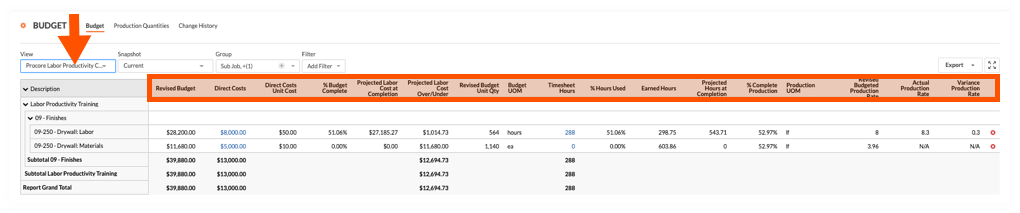
Procore Labour Productivity Cost Budget View in the Budget Tool
The illustration below shows you the recommended layout for the 'Procore Labour Productivity Cost' budget view, as it will look when applied to your project's Budget tool.
Default Columns
The following table details the default columns provided with the 'Procore Labour Productivity Cost' budget view. In the Description column, the following symbols represent the operator for a calculation:
- add (+)
- subtract (-)
- multiply (*)
- divide (/)
| Column Name | Column Type | Column Format | Column Description | Column Configuration |
|---|---|---|---|---|
| Revised Budget | Calculated | Currency | Shows the Original Budget amount, plus the Budget Change amount, plus the Approved VARs amount. | Original Budget Add (+) Budget Changes Add (+) Approved VARs |
| Direct Costs | Source | Currency | Shows the Direct Costs amount. | Source Category: Direct Costs Source: Direct Costs Source Filtering: Status = Pending, Revise and Resubmit, Approved |
| Direct Costs Unit Cost | Source | Number | Shows the actual cost per unit for direct costs. | Direct Costs Divide (/) Direct Costs Unit Qty |
| % Budget Complete | Calculated | Percent | Shows how much of the current budget amount for the budget line item is estimated to be used based on the real-time labour hours and actual labour cost. | Estimated Cost w/ Timesheet Hours Divide (/) Revised Budget |
| Projected Labour Cost at Completion | Calculated | Currency | Shows the projected labour cost at completion for the budget line item. | Projected Hours at Completion Multiply (*) Direct Costs Unit Cost |
| Projected Labour Cost Over/Under | Calculated | Current | Shows the Revised Budget minus the Projected Labour Cost at Completion. | Revised Budget Subtract (-) Project Labour Cost at Completion |
| Revised Budgeted Unit Qty | Calculated | Number | Shows the Budget Production Qty plus the Approved COs Production Qty. | Budget Unit Qty Add (+) Approved VAR Units |
| Budget UOM | Standard | n/a | Shows the Unit of Measure (UOM) for the budget line item. | n/a |
| Timesheet Hours 1 | Source | Number | Shows all Timecard Entry Hours. You can optionally apply Status filters to narrow the data in the view. | Source Category: Timecard Entry Hours Source: Timecard Entry Hours Filtering: None |
| % Hours Used | Calculated | Percent | Shows how much of the current budget unit qty (labour hours) have been used based on time submitted in Procore. | Timesheet Hours Divide (/) Revised Budget Unit Qty |
| Earned Hours | Calculated | Number | Shows the number of labour hours earned (merited) based on the work produced to date for that cost code. |
Revised Budget Unit Quantity |
| Projected Hours at Completion | Calculated | Number | Shows the estimated labour hours needed to complete production for the cost code based on the work produced to date. | Timesheet Hours Divide (/) % Complete Production |
| % Complete Production | Calculated | Percent | Shows the percentage of the production quantity has been installed to date of the current budgeted production quantity for the cost code. | Actual Qty Installed Divide (/) Revised Budgeted Production Qty |
| Production UOM | Source | n/a | Shows the UOM for the budgeted production quantity (i.e., for the cost code on the line item). | Source Category: Production UOM Source: Budgeted Production UOM Source Filtering: n/a |
| Revised Budgeted Production Rate | Calculated | Number | Shows the actual budgeted production rate based on labour hours and installed quantities to date. | Revised Budgeted Production Qty Divide (/) Revised Budget Unit Qty |
| Actual Production Rate | Calculated | Number | Shows the actual budgeted production rate based on labour hours and installed quantities to date. | Actual Qty Installed Divide (/) Timesheet Hours |
| Variance Production Rate | Calculated | Number | Shows the difference between the current budgeted production rate and the actual production rate. A positive number indicates you are performing faster than expected. A negative number indicates you are performing slower than expected. | Actual Production Rate Subtract (-) Revised Budgeted Production Rate |
1 The 'Labor Productivity Cost' budget view is only available to customers using Procore's Resource Tracking tools. However, the 'Timesheet Hours' column can be added to other budget views. To learn how to add the column, see Can we import our third-party timecard entries to work with the 'Timesheet Hours' column in Procore's Budget tool?
Create a Budget View For Equipment
Things to Consider
-
Required User Permissions:
-
'Admin' on the Company Admin tool.
-
-
Additional Information:
-
To set up a budget view for real-time labour productivity, see Resource Tracking and Project Financials: Setup Guide.
-
To set up a labour productivity cost budget view, see Set Up the Procore Labour Productivity Cost Budget View.
-
Any user with 'Read Only' permission or higher on the Budget tool has access permission to apply the view to a project's budget. See Apply the View, Snapshot, Group, and Filter Options on a Budget or Forecasting View.
-
- For companies using the ERP Integrations tool:
- If your company account is using the ERP Integrations tool, Procore automatically provides you with a budget view for your Integrated ERP System. See Which ERP integrations are supported by Procore? for details about your specific ERP connector.
- Any custom budget views that you create for an ERP Integration must contain all of the required ERP data columns. This ensures that Procore can send the required budget data to the company's ERP Integrations tool for acceptance for export to the integrated ERP system by an Accounting Approver. See Send a Budget to ERP Integrations for Accounting Acceptance.
- Required User Permission:
- To add or edit a budget view, 'Admin' on the Company Admin tool.
Note: Your company's Procore account must be using Procore's Project Financials and Resource Tracking tools.
- To add or edit a budget view, 'Admin' on the Company Admin tool.
- Navigate to the Company Admin tool.
- Under Tool Settings, click Budget.
- Click Set Up New Budget View.

- Under Standard Views, highlight Procore Labour Productivity Cost.
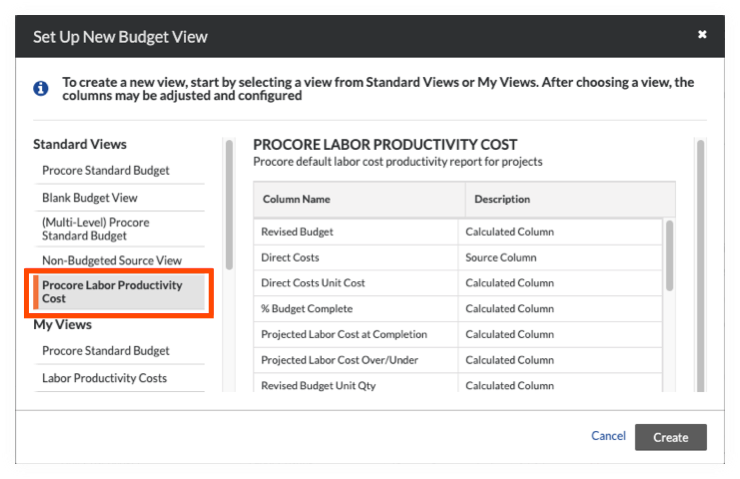
- Click Create.
- Name your view as follows:
- View Name. Enter a name for your new view. In this example, we named it: Labour Productivity Cost
- View Description. Enter a description for your view. In this example, we entered: Recommended view for labour cost productivity report
- Click Configure Columns. This opens the Configure Columns window pictured below. From this point, continue with the next step to Add the Equipment Time Column.
Add Equipment Time Column
Things to Consider
-
Required User Permissions:
-
'Admin' on the Company Admin tool.
-
-
Additional Information:
-
To set up a budget view for real-time labour productivity, see Resource Tracking and Project Financials: Setup Guide.
-
To set up a labour productivity cost budget view, see Set Up the Procore Labour Productivity Cost Budget View.
-
Any user with 'Read Only' permission or higher on the Budget tool has access permission to apply the view to a project's budget. See Apply the View, Snapshot, Group, and Filter Options on a Budget or Forecasting View.
-
-
For companies using the
ERP Integrations tool:-
If your company account is using the ERP Integrations tool, Procore automatically provides you with a budget view for your Integrated ERP System. See Which ERP integrations are supported by Procore? for details about your specific ERP connector.
-
Any custom budget views that you create for an ERP Integration must contain all of the required ERP data columns. This ensures that Procore can send the required budget data to the company's ERP Integrations tool for acceptance for export to the integrated ERP system by an Accounting Approver. See Send a Budget to ERP Integrations for Accounting Acceptance.
-
| Steps from the Configure Columns window… | Settings |
|---|---|
|
 |