Revise an RFI
Objective
To revise an RFI.
Background
After an RFI has been created, there may be a need to revisit an RFI to address project changes or to ask for more specific information. Creating a revision automatically links previous RFI versions to the current one, allowing all participants to easily track the dialogue's progression across all versions
Things to Consider
- Required User Permission:
- To create a revision in the 'Draft' or 'Open' status:
- 'Admin' level permission on the project's RFIs tool.
- 'Standard' level permissions on the project's RFIs tool with the 'Act as RFI Manager' granular permission enabled on your permission template.
- To create a revision in the 'Draft' status:
- 'Standard' level permissions on the project's RFIs tool.
- RFIs must first be closed to create a revision. If the RFI hasn't been closed yet, and you have permissions to close RFIs, you will receive a banner informing you that the RFI will be closed when you create a revision.
- To create a revision in the 'Draft' or 'Open' status:
- Additional Information:
- Once a revision has been issued, the previous version of the RFI will inherit a 'Closed - Revised' status and can't be edited.
Steps
Revise an RFI
- Navigate to the project's RFIs tool.
- Click the Items tab.
- Click View next to the closed RFI you want to revise.
- Click Create a Revision.

- A Previous Request and Official Response section opens where you can copy the original request, and any official responses or attachments to the revision.
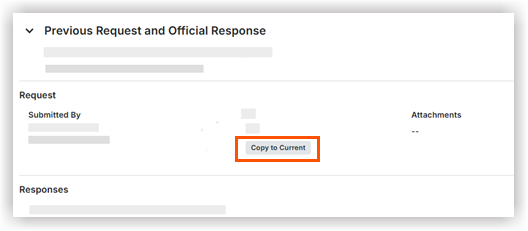
- Once you copy over the previous information, you can still edit or add additional details as needed under the Request and General Information areas.
The RFI Prefix and Number and the Revision number are automatically generated and can't be edited. - Click either Create as Draft or Create as Open (Admin level permissions only).
Creating a draft saves the RFI so you can return for further edits.
OR
Click Send for Review (Standard level permissions). - When you click Create as Open, the previous RFI now has a 'Closed - Revised' status.
A 'Closed - Revised' RFI is no longer editable. - Once multiple revisions have been created, a warning banner will appear if you view an RFI revision that isn't the most recent revision.
- Click the Revision History drop-down or to access the full list of revisions.

quick Filter RFI Revisions
You can also quickly filter your RFI List View by All Revisions (including outdated ones) or by Current Revisions only.
- Click the Select Revision drop-down.
- Select and apply the type of revisions you would like to see in your list view.