About Procore Insights
Table of Contents
- Overview
- Project Insights
- Company Insights
Overview
procore insights availability
Project and Company Insights are now available in all regions for customers on eligible plans with Insights or with purchase of Procore Analytics.Procore Insights help you spot risk early, understand performance trends, and take action with confidence. It's a tool designed to bring the most critical patterns to the surface without guesswork or manual digging. Whether you're managing a single job or overseeing a portfolio, Insights makes the most critical patterns visible.
Key Features:
-
See what matters most: Instantly view project- and company-level insights designed to highlight risk, track performance, and uncover opportunities to improve.
-
Make data-backed decisions: Drive better outcomes by understanding what’s working, what’s not, and how your current performance compares to similar projects.
-
Act on risk before it becomes a problem: With clear call-to-actions, you’ll know where to focus — whether it’s reducing delays, improving quality, or preventing safety issues.
-
Benchmark against the industry: Leverage Procore’s industry-wide dataset to compare your performance to peers and measure progress over time.
-
Gain executive-level visibility: Company-level Insights highlight trends across your portfolio, helping leaders stay ahead of systemic risk and drive strategic action.

Owner Invoice Review
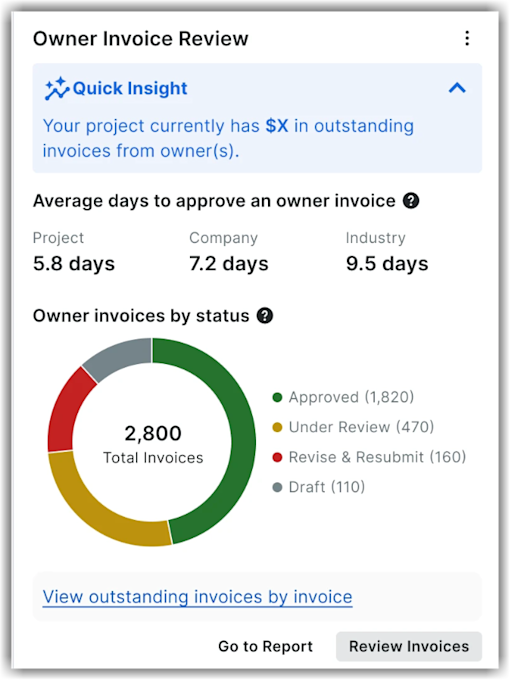
This project-level Insights tool helps you monitor and optimize your invoice and billing workflows for a project. Teams can pinpoint bottlenecks in billing workflows, improve cash flow, and reduce the risk of missed or inaccurate owner invoices.
This insight surfaces key invoice approval metrics by highlighting pending or overdue invoices for the project. Additionally, it reveals owner invoice creation gaps by pinpointing lags between invoice approval and owner invoice creation. This insight helps you to:
-
View the total outstanding owner invoices for the project.
-
See the average days required to approve invoices at the project level, including the company and the industry averages for the relevant cohort.
-
View a summary of owner invoice statuses and average completion days across all active projects, with a portfolio breakdown by project including pending and total counts.
-
Analyze the owner invoices by status. For example, the Insights tool shows the total invoice counts alongside the count of approved, under review, revise and rebuilt, and draft.
-
Drill down to view outstanding invoices by invoice.
Subcontractor Invoice Review
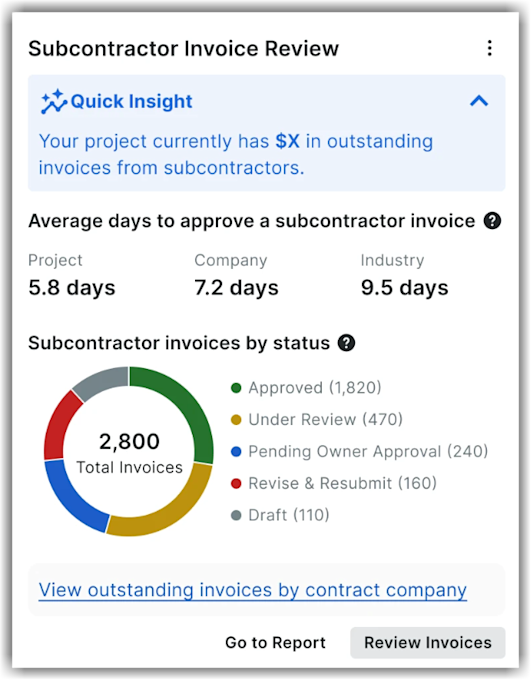
This project-level Insights tool helps you monitor and optimize your invoice and billing workflows for a project. Teams can pinpoint bottlenecks in billing workflows, improve cash flow, and reduce the risk of missed or inaccurate subcontractor invoices.
This insight surfaces key invoice approval metrics by highlighting pending or overdue invoices for the project. Additionally, it pinpoints lags between subcontractor invoice approval and owner invoice creation This insight helps you to:
-
View the total outstanding subcontractor invoices for the project.
-
See the average days required to approve invoices at the project level, including the company and the industry averages for the relevant cohort.
-
View a summary of subcontractor invoice statuses and average completion days across all active projects, with a portfolio breakdown by project including pending and total counts.
-
Analyze the invoices by status. For example, the Insights tool displays total invoice counts and the count of approved, under review, pending owner approval, revise and rebuilt, and draft.
-
Drill down to explore data by contract company to analyze approval times from longest to shortest, total invoices, and amounts. You can view subcontractor invoices by status to highlight outstanding funds (for example, outstanding dollars).
Field-Detected Disruptions
In Beta
The Field-Detected Disruptions Insights tool is in the limited Closed Beta phase.This Insight is accessible through the project-level Insights side panel. The Insight surfaces disruptions captured in Site Diaries that have not yet been linked to a tracked Procore item by extracting delay information from the last four weeks of field descriptions, comments, and entries.
Note
- Companies must enroll in the program and have Daily Log and Insights tools enabled.
- Users with Read-Only access to Daily Logs can view this new insight at both project and company levels (subject to project access).
- Dismissing or restoring a disruption requires Project Admin access; linking requires access to the respective target tool.
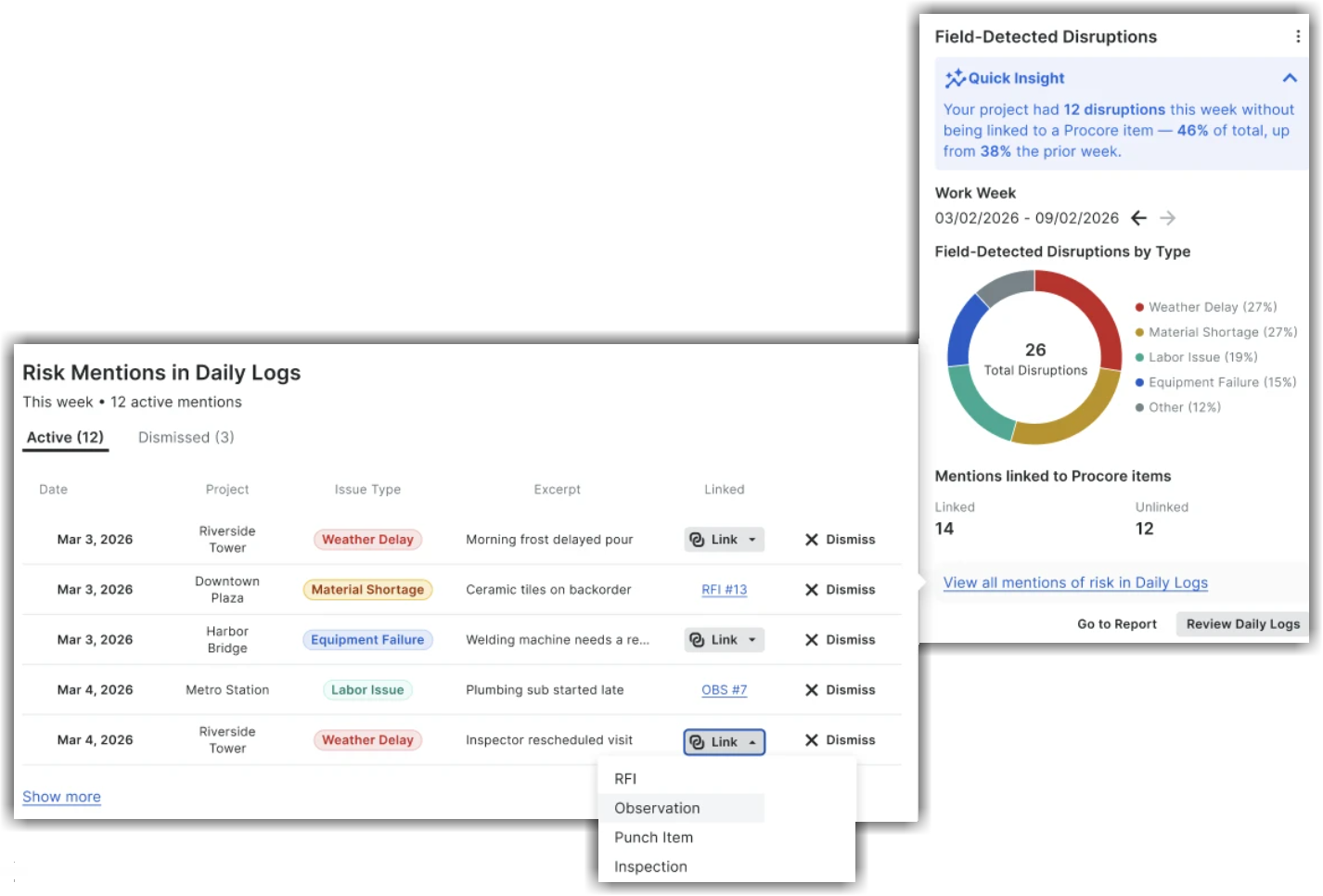
This insight categorizes delays into the following types - Weather Delay, Material Shortage, Labour Issue, Equipment Failure, and Other. It highlights which delay mentions are already linked to an RFI, observation, defect item, or inspection, and how many remain unlinked. Using this insight, you can:
-
See risk for the field logged disruptions - which are grouped by delay type for the selected work week (for example, weather delays, material shortages, labour issues, equipment failures, and other risks). For example, it summarises the current work week with a Quick Insight callout.
-
View a chart breaking disruptions down by type — including Weather Delay, Material Shortage, Labor Issue, Equipment Failure, and Other — and a linkage rate showing the count of mentions linked versus unlinked.
-
Find what still needs an action — a linked-versus-unlinked view shows which disruptions are tied to an RFI, Observation, or Incident and which are still just field notes.
-
Move from insight to action — From the expanded view, you can review every active mention of risk in the selected work week with the date, project, issue type, excerpt, and linkage status. Then, you can jump directly into the Site Diary to link the mention to an existing RFI, Observation, or Issue, or perform one of the following actions:
-
Dismiss the delay type,
-
Directly link the object that allows to create a new workflow for the problem tools, or
-
Open the Daily Log or a report in context.
-
By making unstructured Daily Log content actionable, this Insight helps project teams close the loop on field-reported risks faster and gives company leaders visibility into how consistently disruptions are being followed up across the portfolio.
Click View all mentions of risk in Site Diaries to view a pop-out displaying all mentions within the site diaries. Click Show More to view a modal displaying up to 12 mentions.
Equipment Utilization - Last 7 Days
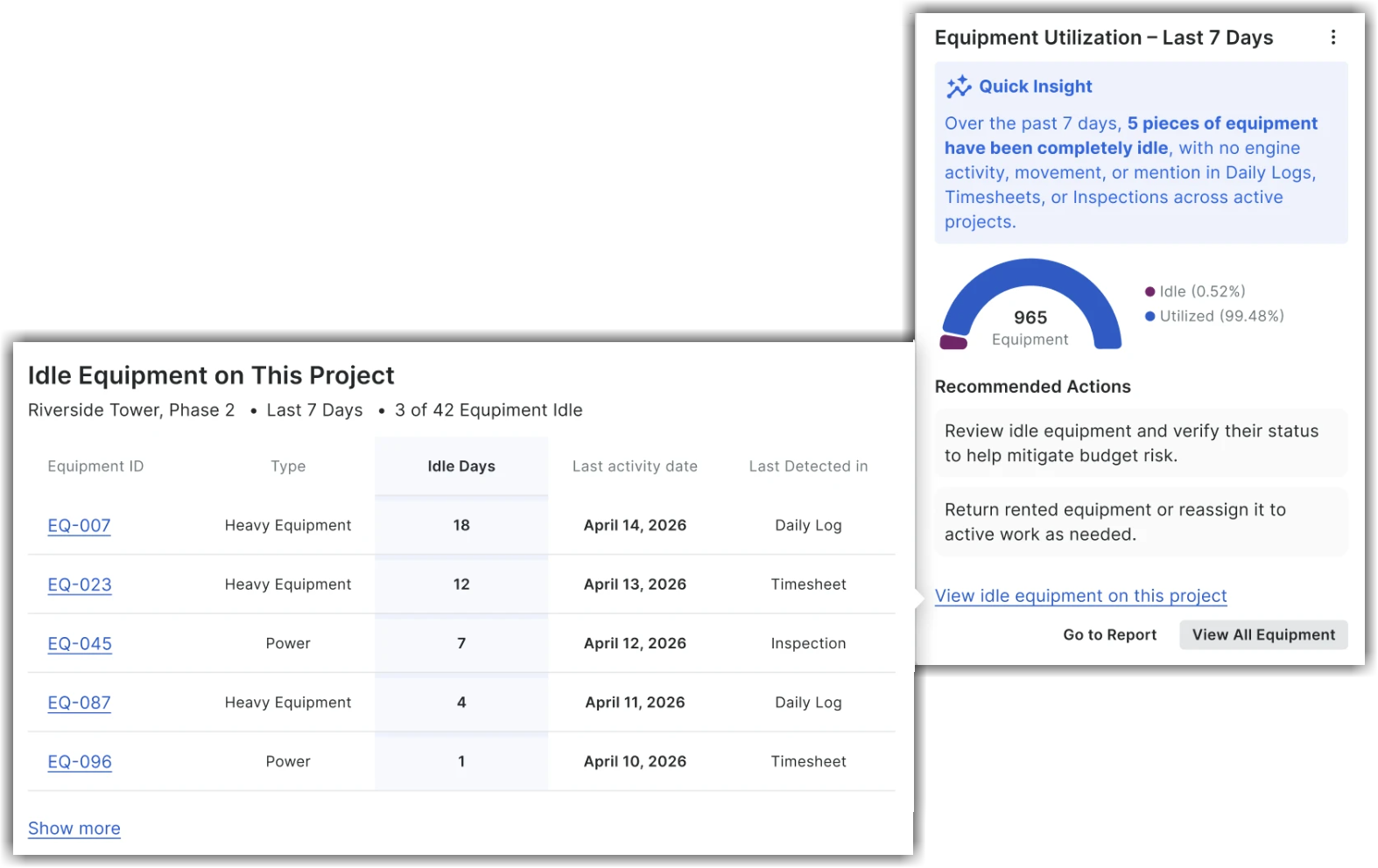
This project-level Insights tool helps you rack equipment activity directly at the project level. This Insights tool is available in the Project Insights side panel. Project teams can quickly identify and address idle equipment or machinery to reduce unnecessary costs. They can monitor equipment usage and idle equipment over a trailing 7-day window without manually cross-referencing Site Diaries, Timesheets, Inspections, and rental records, and get two concrete next actions in the tool.
The Equipment Utilization - Last 7 Days Insights tool shows the following:
-
Quick Insight Section: Instantly see the total count of equipment sitting completely idle over the past 7 days (for example, no engine activity, movement, or mentions in Daily Logs, Timesheets, or Inspections).
-
Equipment Utilization Breakdown Chart: View the interactive donut chart - which shows total equipment on the project with utilized and idle shares, and a 100% positive state when all equipment is active.
-
Recommended Next Actions: Access direct guidance to review idle equipment, return rented equipment, or reassign machinery to active scopes of work, and mitigate budget risk.
-
Detailed Drill-Down: Click View Idle Equipment on This Project to view an itemized list of idle equipment records in a different screen. This new screen contains a header showing the project name, the 7-day window, and how many of the project's equipment records are idle. You can view the equipment records list with Equipment ID, Type, Idle Days, Last Activity Date, and Last Detected in (the source where it was last detected - for example, Site Diary, Timesheet, or Inspection sorted by Idle Days).
Click View All Equipment to navigate to the project's Equipment tool directly from this Insights tool. Similarly, click Got to Reports to go to the Reports page.
Out-of-Scope Change Events
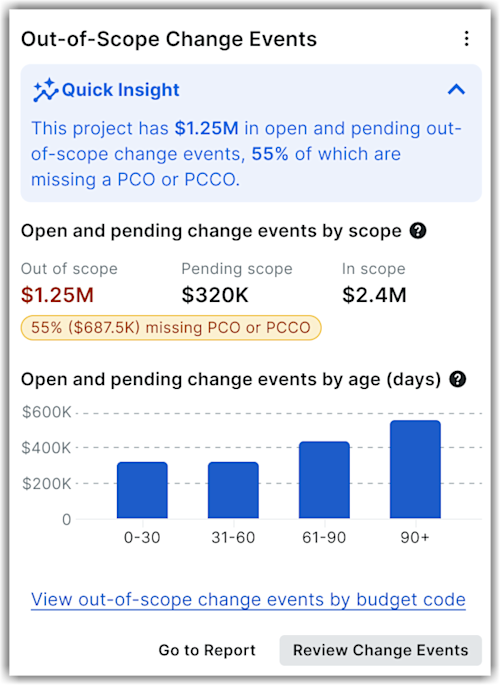
This project level Insights tool is available in the Insights side panel. This Insights tool shows how much open and pending change event value sits outside the current contract scope for a project. It summarises total out-of-scope value, breaks it out against pending scope and in scope value, and calls out the percentage and dollar value that is still missing a Potential Change Order (PCO) or Head Contract Change Order (PCCO). It surfaces unbilled out-of-scope exposure and its age directly. Project and finance teams can find unbilled scope earlier, prioritise which change events need a change order first, and reduce the aged exposure that is hardest to recover.
The project level Out-of-Scope Change Events Insights tool shows the following:
-
Quick Insight: This section summarizes the total open and pending out-of-scope change event value and the percentage of it missing a PCO or PCCO for the project.
-
Open and pending change events by scope: This section displays a three-metric row showing Out of scope (emphasized), Pending scope, and In scope values for the project. It also highlights the percentage and dollar value that is still missing a PCO or PCCO. This helps teams to track the out-of-scope exposure without manually auditing the Change Events log.
-
Open and pending change events by age (days): This section displays a bar chart grouping open and pending change event values by age in 0-30, 31-60, 61-90, and 90+ day ranges. This helps you see how long exposure has been outstanding for the project. The age breakdown indicates teams which exposure to prioritise first.
-
Drill-down option: Click View out-of-scope change events by budget code to view the Change Events Driving Exposure table. This table lists the op budget codes by out-pf-scope change event exposure for the project, with Budget Code, Total, Line Items, and Incomplete Line Items columns.
Click Review Change Events to navigate to the Change Events tool directly. Similarly, click Got to Reports to go to the Reports page.
Workforce Demand vs. Capacity Gap
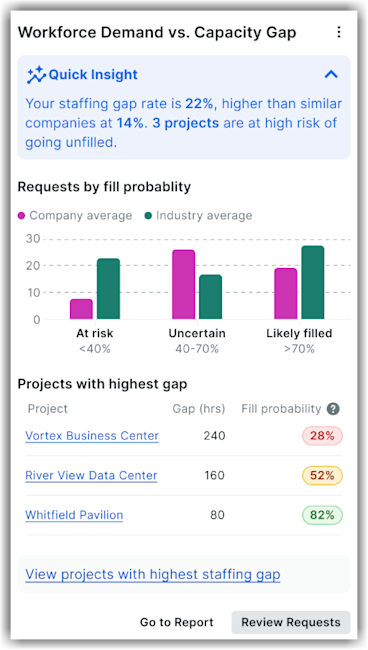
The company-level Insights tool provides a forward-looking, portfolio-wide view of where planned labor hours exceed confirmed crew capacity over a configurable horizon (defaulting to the next 4 weeks). This Insight provides a quick summary showing projects at risk of understaffing and weeks with portfolio-level shortfalls. Workforce planning is currently manual and reactive — understaffing is often discovered only when projects start slipping, causing schedule delays, overtime costs, and rushed crew reassignments. This Insight makes short-horizon understaffing risk visible at the portfolio level so leaders can act proactively. The Insight shows:
-
A Gap Analysis bar comparing Planned, Confirmed, and Gap hours. You can see the size of the shortfall in absolute terms.
-
A half-gauge visualizing total number of projects at risk.
-
A ranked list of top projects missing workforce hours, showing the project name, the week the gap occurs, and the size of the gap in hours. This helps resource managers and operations leaders know exactly where to focus.
-
Drill-through options to see the full report or open the total hours view to rebalance site teams, accelerate hiring, or adjust programs before shortfalls reach the field. Click View projects with highest staffing gap to view the list of active projects that are at risk of understaffed.
Company Owner Invoices Review
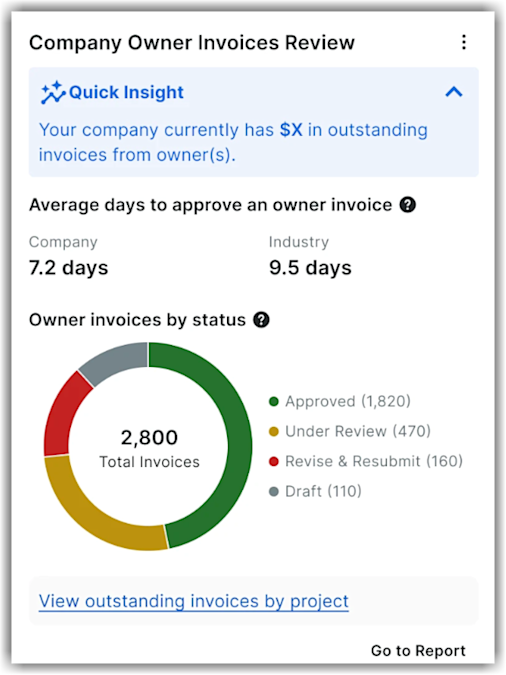
This company-level Insights tool helps you monitor and optimize your invoice and billing workflows. Teams can pinpoint bottlenecks in billing workflows, improve cash flow, and reduce the risk of missed or inaccurate owner invoices.
This insight surfaces key invoice approval metrics by highlighting pending or overdue invoices. Additionally, it reveals owner invoice creation gaps by pinpointing lags between invoice approval and owner invoice creation. This insight helps you to:
-
View the total outstanding owner invoices across projects.
-
See the average days required to approve invoices at the company level, including historical data comparisons from similar project types and sizes. You can also see the industry averages for the relevant cohort.
-
Analyze the owner invoices by status. For example, the Insights tool shows the total invoice counts alongside the count of approved, under review, revise and rebuilt, and draft.
-
Drill down to view outstanding invoices by project.
Company Subcontractor Invoice Review
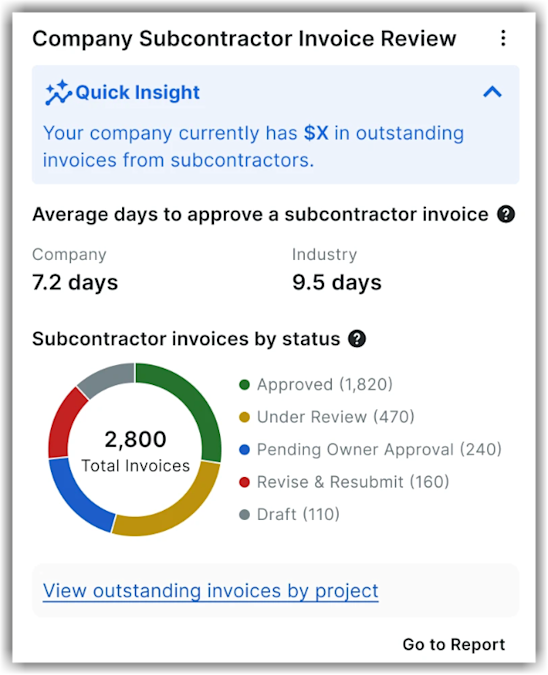
This company-level Insights tool helps you monitor and optimize your invoice and billing workflows. Teams can pinpoint bottlenecks in billing workflows, improve cash flow, and reduce the risk of missed or inaccurate subcontractor invoices.
This insight surfaces key invoice approval metrics by highlighting pending or overdue invoices. Additionally, it pinpoints lags between subcontractor invoice approval and owner invoice creation. This insight helps you to:
-
View the total outstanding subcontractor invoices across projects.
-
See the average days required to approve invoices at the company level, including historical data comparisons from similar project types and sizes. You can also see the industry averages for the relevant cohort.
-
Analyze the subcontractor invoices by status. For example, the Insights tool displays total invoice counts and the count of approved, under review, pending owner approval, revise and rebuilt, and draft.
-
Drill down to view outstanding invoices by project.
Workers Under 40 Hours
Overlapping Time Entries
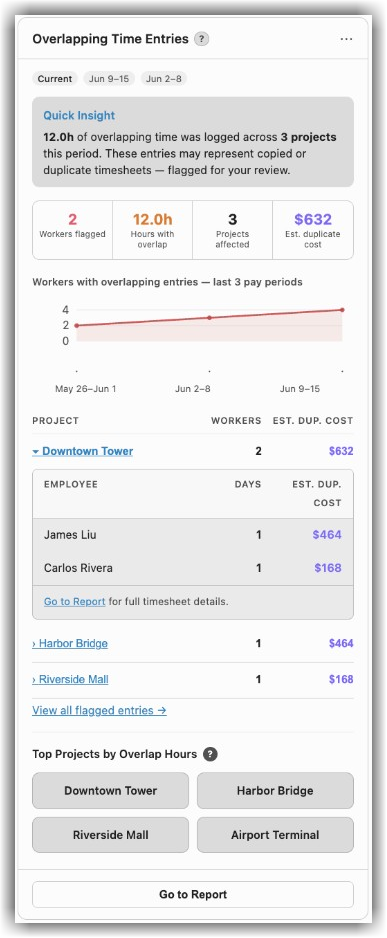
This company-level Insights tool helps you find workers who logged overlapping hours across multiple projects during a pay period. It shows at the company level how many workers have time entries that overlap on the same day, along with total overlapping hours, the number of projects impacted, and the estimated duplicate labor cost based on payroll. Using this insight, payroll and operations teams can identify and correct duplicate entries before they affect job costs.
Note: The Overlapping Time Entries Insight is available with the Project Execution Enterprise package (not Resource Management).
The Overlapping Time Entries Insight shows the following:
-
A Quick Insight summary indicating the hours of overlapping time entries logged across your projects. It also notes that these entries may represent copied or duplicate timesheets, flagged for your review.
-
A statistical summary displaying the number of workers flagged, total hours with overlap, projects affected, and the estimated duplicate cost.
-
A trend chart tracking workers with overlapping entries over the last three pay periods.
-
A project table showing the breakdown of the workers and estimated duplicate cost per project, and each project expands to show the affected employees. For example, this insight shows breakouts by project and by individual worker, illustrating which multiple projects they are assigned to on a specific date.
-
A detailed list with one row per timecard entry on a flagged day, including the worker, classification, date, project, hours, and duplicated cost. Click the View all flagged entries link to open the All Overlapping Entries screen that displays the detailed list.
-
A view of the top projects by overlapping hours. Click Go to Report to open the full report to review and correct entries.
Field-Detected Disruptions
In Beta
The Field-Detected Disruptions Insights tool is in the limited Closed Beta phase.This Insight is accessible through the company-level Insights side panel. The Insight surfaces disruptions captured in Site Diaries that have not yet been linked to a tracked Procore item by extracting delay information from the last four weeks of field descriptions, comments, and entries.
Note
- Companies must enroll in the program and have Daily Log and Insights tools enabled.
- Users with Read-Only access to Daily Logs can view this new insight at both project and company levels (subject to project access).
- Dismissing or restoring a disruption requires Project Admin access; linking requires access to the respective target tool.
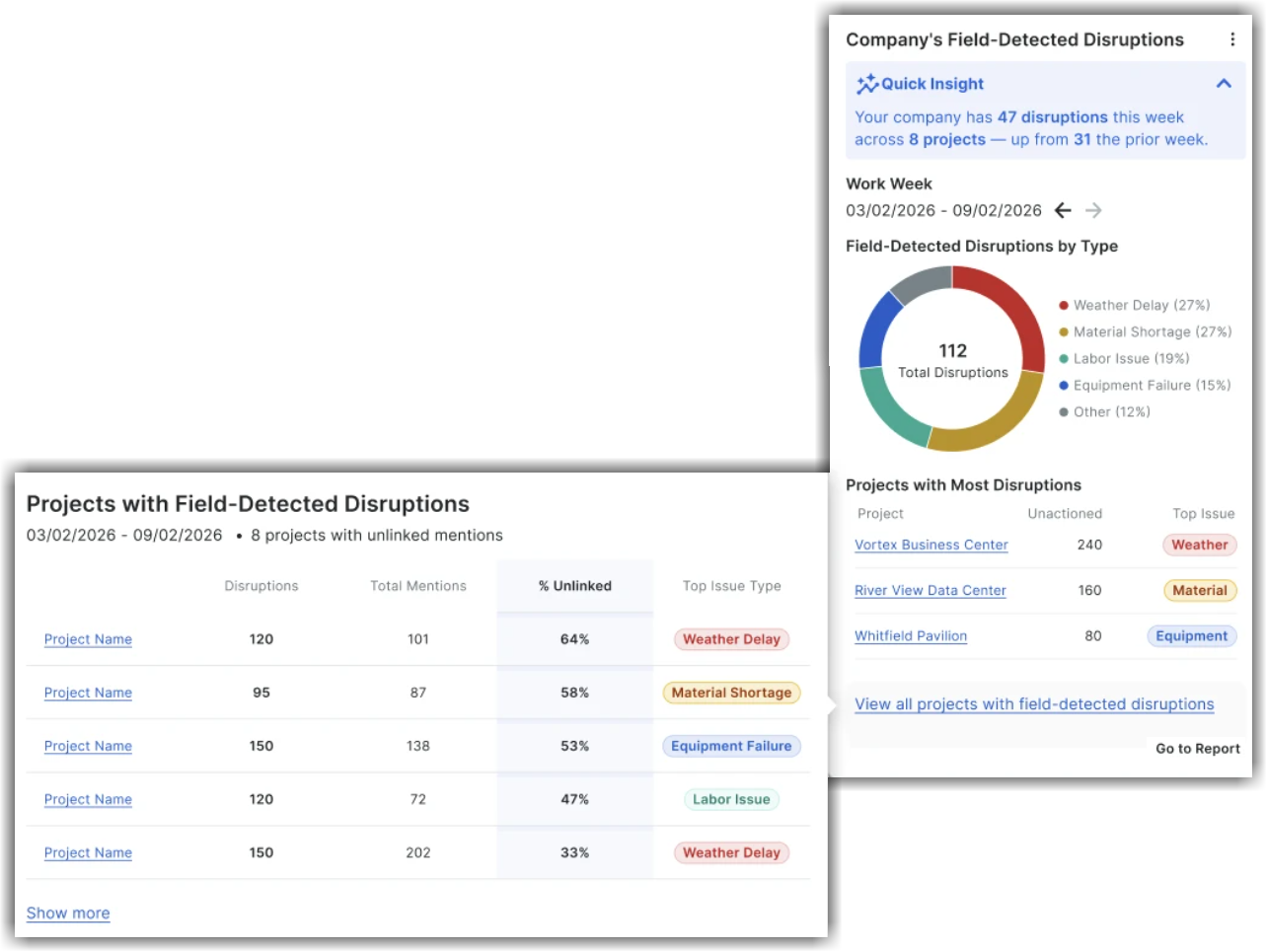
This insight categorizes delays into the following types - Weather Delay, Material Shortage, Labour Issue, Equipment Failure, and Other. It highlights total count of disruptions across active projects, count of delay mentions, and the percentage of unlinked mentions with top issues types for each project. Using this insight, you can:
-
See projects with most disruptions - which are grouped by delay type for the selected work week (for example, weather delays, material shortages, labour issues, equipment failures, and other risks). For example, it summarises the current work week with a Quick Insight callout.
-
View a chart breaking disruptions down by type — including Weather Delay, Material Shortage, Labor Issue, Equipment Failure, and Other - and the name of projects with the count of unactioned disruptions.
-
Find what still needs an action — total count of mentions and the percentage of unlinked disruptions show which projects have the most unlinked risk.
-
Move from insight to action — From the expanded view, you can review details of projects with unlinked mentions and the count of disruptions. Click on the desired project name to view detailed information.
By making unstructured Daily Log content actionable, this insight helps project teams close the loop on field-reported risks faster and gives company leaders visibility into how consistently disruptions are being followed up across the portfolio.
Click View all projects with field-detected disruptions to view a pop-out displaying all projects with field-detected disruptions. in the site diaries.
Out-of-Scope Change Events
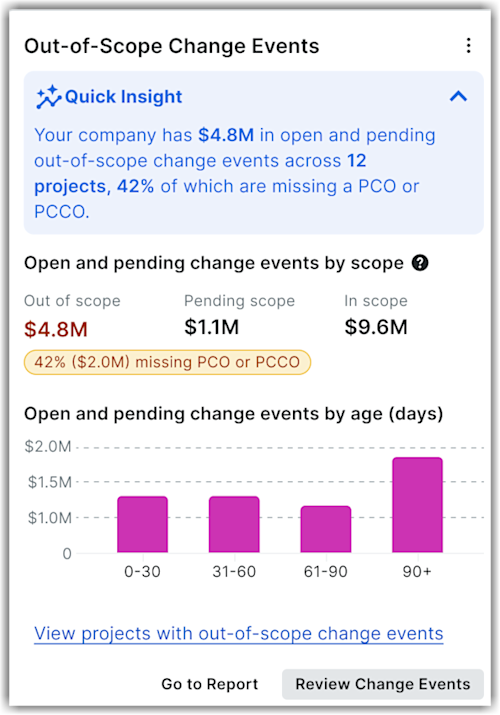
This company level Insights tool is available in the Insights side panel. This Insights tool shows how much open and pending change event value sits outside the current contract scope across projects. It summarises total out-of-scope value, breaks it out against pending scope and in scope value, and calls out the percentage and dollar value that is still missing a Potential Change Order (PCO) or Head Contract Change Order (PCCO). It surfaces unbilled out-of-scope exposure and its age directly. Project and finance teams can find unbilled scope earlier, prioritise which change events need a change order first, and reduce the aged exposure that is hardest to recover.
The company level Out-of-Scope Change Events Insights tool shows the following:
-
Quick Insight: This section summarises the total open and pending out-of-scope change event value and the percentage of it missing a PCO or PCCO. It also shows how many projects contribute to that value.
-
Open and pending change events by scope: This section displays a three-metric row showing Out of scope (emphasized), Pending scope, and In scope values across projects. It also highlights the percentage and dollar value that is still missing a PCO or PCCO. This helps teams to track the out-of-scope exposure without manually auditing the Change Events log.
-
Open and pending change events by age (days): This section displays a bar chart grouping open and pending change event values by age in 0-30, 31-60, 61-90, and 90+ day ranges. This helps you see how long exposure has been outstanding. The age breakdown indicates teams which exposure to prioritise first.
-
Drill-down option: Click View projects with out-of-scope change events to view the Projects Driving Exposure table. This table lists top projects with Project Name, Contract Value, Out of Scope Change Events, and % Missing PCO/PCCO columns. Click a project name to view details.
Click Review Change Events to navigate to the Change Events tool directly. Similarly, click Got to Reports to go to the Reports page.