

Export a List of Head Contracts
Objective
To export a head contracts list to the CSV for PDF file format.
Background
After you create one (1) or more head contracts, you can export a list of those contracts using the Export menu on the Head Contracts tool's main page.
Things to Consider
- Required User Permissions:
- To export a head contracts list, 'Read Only' level permissions or higher on the project's Head Contracts Tool
Prerequisites
Steps
- Navigate to the project's Head Contracts tool.
- Click the Export drop-down menu and select one (1) of these options:
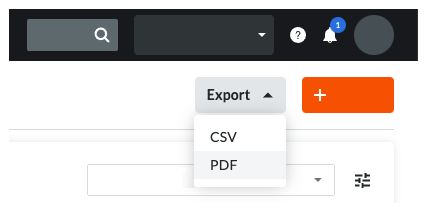
- CSV. Choose this option to download a CSV file to your web browser's download location.
- PDF. Choose this option to generate a PDF and open it in a new browser window. You can then click the Download or Print icon in the top-right corner of your browser window.