

Set or Release Retention on an Owner Progress Claim in the Head Contracts Tool (Legacy)
Procore Internal ONLY
This page was details the legacy experience of owner invoicing. With the legacy experience, these steps can also be performed with the Invoicing tool. See Set or Release Retention on an Owner Progress Claim (Legacy). There is no equivalent page in the modernised experience. Instead, the ability to edit retention values is now part of the Edit Owner Progress Claims in the Update the Line Items Using the Contract's Accounting Method section.
Objective
To set or release retention for line items on an owner progress claim with the Head Contracts tool.
Background
Things to Consider
- Required User Permissions:
- 'Admin' level permissions on the project's Head Contracts tool.
Prerequisites
Steps
- Navigate to the project's Head Contracts tool.
- Click the Progress Claims tab.
- Locate the owner progress claim that you want to work with.
- Click the Detail tab.
- Click the Edit button.
- Choose one of the following:
Set Retention on All Line Items
- Under Set Retainage on All Line Items, do the following:
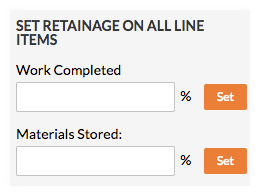
- Enter the percentage to withhold in the Work Completed box.
- Click Set.
- Enter the percentage to withhold in the Materials Stored box. To learn more, see How do I bill for stored materials in Procore? (Legacy)
- Click Set.
Release Retention on All Line Items
- Under Release Retainage on All Line Items, do the following:
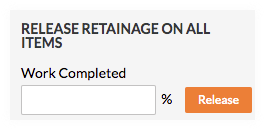
- Enter the percentage to release in the Work Completed box.
- Click Release.
See Also
If you would like to learn more about Procore's prime contract software and how it can help your business, please visit our construction contract management software product page  .
.
.